
GWiki - Wikipedia for Android0.3.3 - Get APK
You'll be able to download in few seconds.
Publisher Description
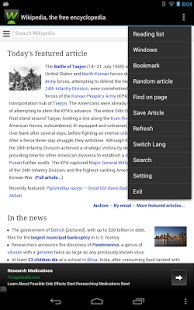
GWiki is a simple and effictive Wikipedia client,which is faster than the browser. GWiki can present all of the Wikipedia's articles very well.
Features:
- Wikipedia client for view all of Wikipedia’s articles
- Multiple windows support
- Language quick switch
- Light/Dark Theme
- Bookmark classification
- Download wikipedia article
- Support Offline reading
- Support App to SD
- Support Find on page
- Live search suggestions
- Jump to a random article
- Quick Search Box integration & a search widget
- 150 Wikipedia languages
- Auto detect language
- Adjustable text size
- Copy text from articles
- Share article with friends
- nearby article (location base)
User Reviews:
Jesse Thompson: Seems to support every feature people complain about in the official app. Forward / back buttons,
random page button, does let you browse non - English Wikipedias better layout.
Zijun Zhao: Better than the offical one despite the network block in China, this app can still visit wikipedia while the official one can't.
vikash singh: Great app Provides login facility and bookmark ur pages, save page for later or offline reading,
zooming as well as tabbed browsing. Thats really gr8 but could be improved even better.
Agung Trianto Widya Nugraha: Fast & simple I like that this app loads lightly and simple. Easy top copy text and sends it to
my translator app either. Good work, dev!
About GWiki - Wikipedia for Android
The company that develops GWiki - Wikipedia for Android is AndyMike. The latest version released by its developer is 0.3.3.
To install GWiki - Wikipedia for Android on your Android device, just click the green Continue To App button above to start the installation process. The app is listed on our website since 2013-11-20 and was downloaded 0 times. We have already checked if the download link is safe, however for your own protection we recommend that you scan the downloaded app with your antivirus. Your antivirus may detect the GWiki - Wikipedia for Android as malware as malware if the download link to org.strive.wikipedia is broken.
How to install GWiki - Wikipedia for Android on your Android device:
- Click on the Continue To App button on our website. This will redirect you to Google Play.
- Once the GWiki - Wikipedia for Android is shown in the Google Play listing of your Android device, you can start its download and installation. Tap on the Install button located below the search bar and to the right of the app icon.
- A pop-up window with the permissions required by GWiki - Wikipedia for Android will be shown. Click on Accept to continue the process.
- GWiki - Wikipedia for Android will be downloaded onto your device, displaying a progress. Once the download completes, the installation will start and you'll get a notification after the installation is finished.
Program Details
System requirements
Download information
Pricing
Version History
version 0.3.3
posted on 2013-11-20
- fix Wikipedia picture not display ,- fix nearby feature not work
version 0.2.7
posted on 2012-08-31
Several fixes and updates
Disclaimer
External Download
We do not host GWiki - Wikipedia for Android on our servers. We did not scan it for viruses, adware, spyware or other type of malware. This app is hosted by Galad and passed their terms and conditions to be listed there. We recommend caution when installing it.
The APK Download link for GWiki - Wikipedia for Android is provided to you by apps112.com without any warranties, representations or guarantees of any kind, so access it at your own risk.
If you have questions regarding this particular app contact the publisher directly. For questions about the functionalities of apps112.com contact us.
